SSL Check
For financial and technical reasons, this website is using a self-signed SSL certificate. (Short version: I can't afford/refuse to pay for the necessary *.wildcard SSL certificate.)
This results in a scary error message when connecting over SSL, which cannot be helped. This is normal, expected, and probably does not indicate any issue. However - this setup does make it difficult to determine whether your SSL connection to this website is being man-in-the-middle'd by your ISP or a third party.
The certificate below may be manually compared against the certificate your browser has received. If they do not match, something fishy might be going on.
How to verify this certificate
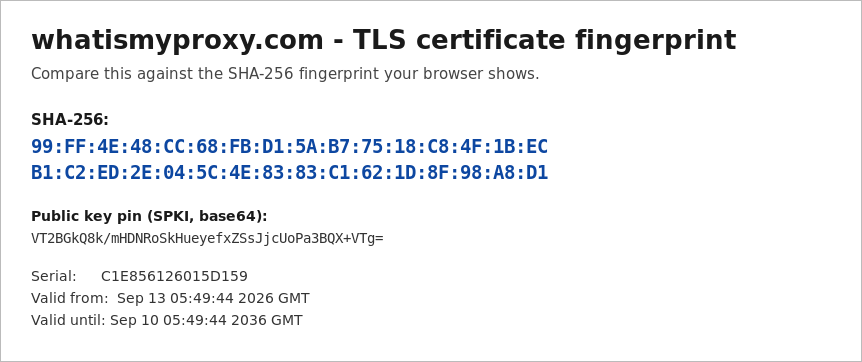
Compare the SHA-256 fingerprint below against the one your browser shows. That single value identifies the certificate completely — if it matches, you are talking to this server and nothing has been substituted in between. Comparing the whole certificate body is not necessary, though it is published below as well.
To see it in your browser: click the padlock (or the warning icon) in the address bar → Connection is not secure / Certificate → Details, and look for SHA-256 Fingerprint.
SHA-256 fingerprint — check this one
Other identifiers
| SHA-1 fingerprint | unavailable |
| Public key pin (SPKI, base64) | unavailable |
| Serial number | ? |
| Subject | ? |
| Issuer | self-signed (issuer equals subject) |
| Valid from | ? |
| Valid until | ? |
Certificate
Text on a web page can be rewritten in transit, so the same fingerprint is also published as an image, which is harder to alter convincingly: cert.png. If the image and the text above disagree, trust neither and treat the connection as compromised.